


Search
How to check LINUX server version?
- Nov 23, 2020
- 1 min read
In Linux server , there are many commands that can be used to check operating system version.
1) The first command that can be used to check Ubuntu server version is, as Ubuntu suggest, the lsb_release -a command. Here is the example:
root@HP06Ubuntu:~# lsb_release -a
No LSB modules are available.
Distributor ID:	Ubuntu
Description:	Ubuntu 20.04.1 LTS
Release:	20.04
Codename:	focal
root@HP06Ubuntu:~# 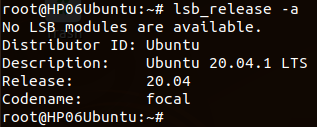
2) Second command that we can use to check Linux version is cat /proc/version. See example below:
root@HP06Ubuntu:~# cat /proc/version
Linux version 5.4.0-54-generic (buildd@lcy01-amd64-024) (gcc version 9.3.0 (Ubuntu 9.3.0-17ubuntu1~20.04)) #60-Ubuntu SMP Fri Nov 6 10:37:59 UTC 2020
root@HP06Ubuntu:~# 
3) We can also view all information about Ubuntu server using uname -a option:
root@HP06Ubuntu:~# uname -a
Linux HP06Ubuntu 5.4.0-54-generic #60-Ubuntu SMP Fri Nov 6 10:37:59 UTC 2020 x86_64 x86_64 x86_64 GNU/Linux
root@HP06Ubuntu:~# 


Comments