


How to mount shared folder from Windows in Vmware.
Follow Below Steps to mount shared folder from Windows using Vmware and Redhat :
1) Verify that the tools are installed in RHEL OS.
sudo yum list |grep -i open |grep -i vm
2) If its not installed, install the tools.
sudo yum install open-vm-tools open-vm-tools-desktop
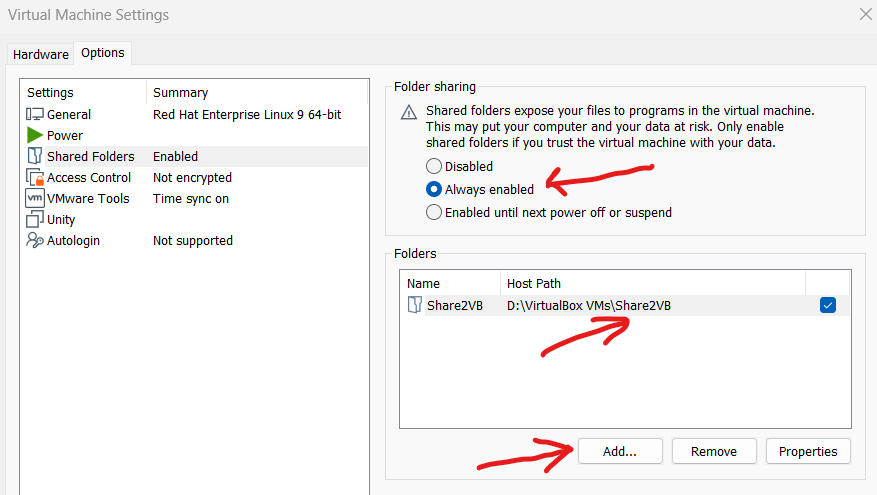
3) Verify that in VMWare Workstation that the shared folders is turned on, and will be connected. In my case I have a folder called "D:\VirtualBox VMs\Share2VB" to be shared.
To share a local folder using your VMware: Go to VM menu, after Settings > Options > Shared Folders and click on ‘Always enabled’. After, click on ‘Add…’ button and choose your local folder to share it.
4) Make storage location for said shared folder within Red Hat -
sudo mkdir /SHARED
sudo chmod 777 /SHARED
sudo /usr/bin/vmhgfs-fuse .host:/Share2VB /SHARED -o subtype=vmhgfs-fuse,allow_other
This tested under Red Hat Enterprise 9.3, by default on a clean install with GUI server selected along with some classic development tools.
That's all in this post. If you liked this blog and interested in knowing more about UNIX / LINUX / AIX. Please Like, Follow, Share & Subscribe to www.ImJhaChandan.com


Comments