


SQL Server : How to change server collation.
- Jha Chandan

- Nov 19, 2020
- 2 min read
The Server Collation acts as the default collation for all the system databases on that instance of SQL Server and also for the newly created user databases. The Collation for an instance is specified during the setup of SQL Server, whereas this can be changed at any point of time by rebuilding the master database and specifying the new collation.
This operation will overwrite the system databases and hence it is strongly recommended to have a complete system backup before proceeding with this activity.
Before you proceed,
Make sure you have backup of all user database, jobs, logins, maintenance plans, etc..
Drop / Detach all user databases
Rebuild Master database by specifying new collation
For SQL Server 2005: Check the current Collation of the server by running the below script
SELECT SERVERPROPERTY('collation') AS [Server Collation]
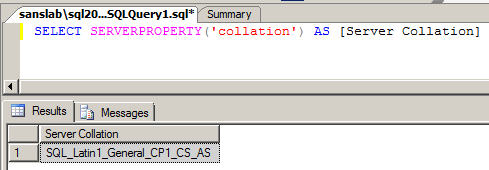
Navigate to the setup path using command prompt and run the below query by changing the parameters
start /wait setup.exe /qb INSTANCENAME=SQL2005 REINSTALL=SQL_Engine REBUILDDATABASE=1 SAPWD=yourSApassword SQLCOLLATION=SQL_Latin1_General_CP1_CI_AI

This will start the GUI for setup

Once the Installation of Prerequisites is completed, you will be presented with the below screen

Click "Yes"

Once this configuration is completed, it will automatically close the GUI.
Now you can verify the change of collation by executing the below commands
SELECT SERVERPROPERTY('collation') AS [Server Collation]

For SQL Server 2008, SQL Server 2008 R2, SQL 2012,
Check the current Collation of the server by running the below script
SELECT SERVERPROPERTY('collation') AS [Server Collation]

Navigate to the setup path using command prompt and run the below query by changing the parameters
Setup /QUIET /ACTION=REBUILDDATABASE /INSTANCENAME=InstanceName/SQLSYSADMINACCOUNTS=adminaccount /[ SAPWD= StrongPassword ]/SQLCOLLATION=CollationName

Wait for the configuration to complete

Verify the change of collation by executing the below commands
SELECT SERVERPROPERTY('collation') AS [Server Collation]
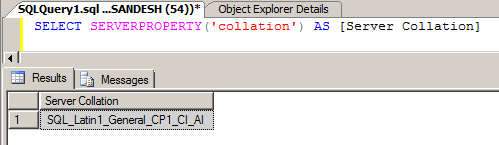
Once the activity of changing the collation is completed,
Recreate / Attach the users databases
Make sure to verify / recreate the jobs, logins, maintenance plans, etc..



Comments