


Azure SQL Server & Active Directory Admin.
- Jan 1, 2022
- 2 min read
In this blog we will see and learn Azure admin accounts 'Server Admin' and 'Active Directory Admin' are the ones which has similar access like 'sa' account to limited options available in Azure SQL Database. This is a SQL Authenticated account and if we want to use AAD authentication (like Windows authentication for SQL Server) we need have an AD admin too.

Server Admin
This account is similar to SQL Server 'sa' account and you had already configured "Server Admin" and it's password while creating the Azure SQL Server.

Note : The name of Server admin cannot be changed once it is configured but we can change it’s password.

Go to the Azure SQL Server and on the Overview tab in the top bar options we also have the option to 'Reset Password'. Just reset the password and save it.
Active Directory Admin
We generally add the SQL Server DBAs group as the Active Directory admin. It does not exist by default but we can create this account from the azure portal. Those having the owner permission on to the SQL Server resource and having access to view users in AAD can only set the AD admin.
So in order to set the AD admin click “Active Directory admin” section under Settings tab of our Azure SQL Server.
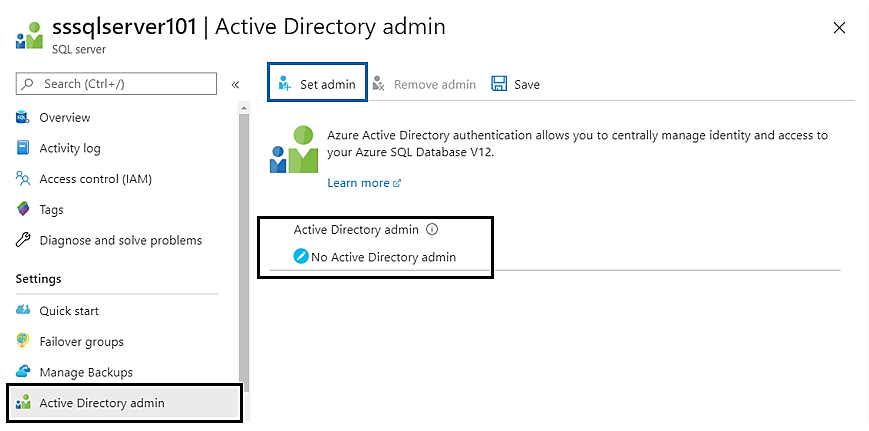
If its not already set then we will not have any AD admin there. To set this we need to click on the 'Set admin' on the top and choose the required AD account from the list of users available like SQLAdmin1 account which I'v created for use.

Once you have selected the AD Admin account, click on 'Select'.

No we can connect to our Azure SQL Database using either the Server Admin or the Active Directory admin similar like sysadmin connection to our Azure SQL Server.
That's all in this post. If you liked this blog and interested in knowing more about Azure, Please Like, Follow, Share & Subscribe to www.ImJhaChandan.com .


Comments